Serifu vs AI Manga Translator: Tested on the Same 5 Pages (2026)
Serifu vs AI Manga Translator (ai-manga-translator.com), tested on the same five manga, manhwa and webtoon pages: lettering, text on the art, accuracy, what you can fix after the translation, and price.
Serifu · · 10 min read
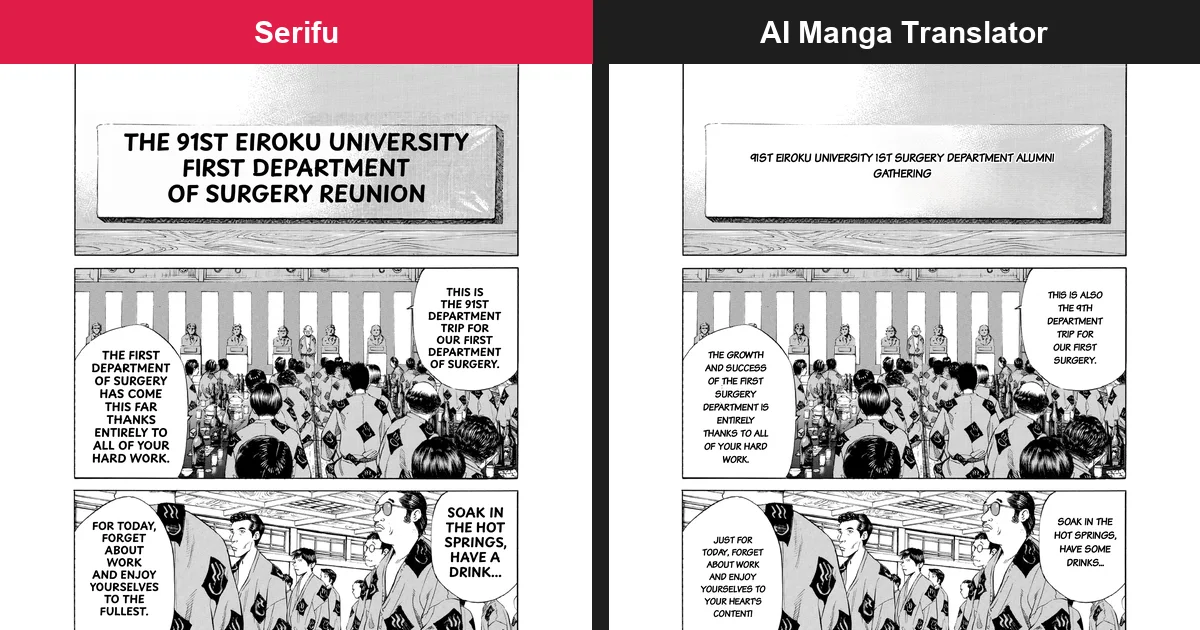
Serifu's pages read better than AI Manga Translator's on the same input: the translation fills the bubbles, no punctuation is stranded on a line of its own, no original text is left half erased, and text drawn on the art is kept until you retouch it, then replaced cleanly, instead of being replaced with the wrong word. And where AI Manga Translator's result is final, Serifu lets you fix any line, its lettering and the art, keeps names the same across a series, and never keeps your pages on its servers.
We ran the same five pages through both on 6 October 2026, with English as the target and every setting left at its default. This post is written by the team behind Serifu, so every result below is shown as it came out, both sides cut from the same place on the page, Serifu on the left and AI Manga Translator on the right; every fact about AI Manga Translator comes from its own site on that date.
Serifu vs AI Manga Translator at a glance
Serifu gives you a cleaner page to start from, and everything on it stays yours to change; AI Manga Translator gives you a finished image.
| Serifu | AI Manga Translator (ai-manga-translator.com) | |
|---|---|---|
| What it is | Website and desktop app (macOS, Windows) | Website and Chrome extension |
| Pages from | Folder, CBZ, ZIP, PDF, images | Images, PDF, EPUB, CBZ |
| Translation model | Chosen by you before a run | "Claude AI" (their FAQ); not chosen |
| Context for each page | The page and the two pages before it (Translate in order, on by default) | Pages processed in parallel (their FAQ); nothing said about pages seeing the ones before |
| After the run | Every line can be selected, changed or re-translated | Images to view and download; nothing can be changed |
| Text it missed | Box, read and translate | Upload the page again |
| Names across a series | Project, glossary, story and characters | Each upload starts from nothing |
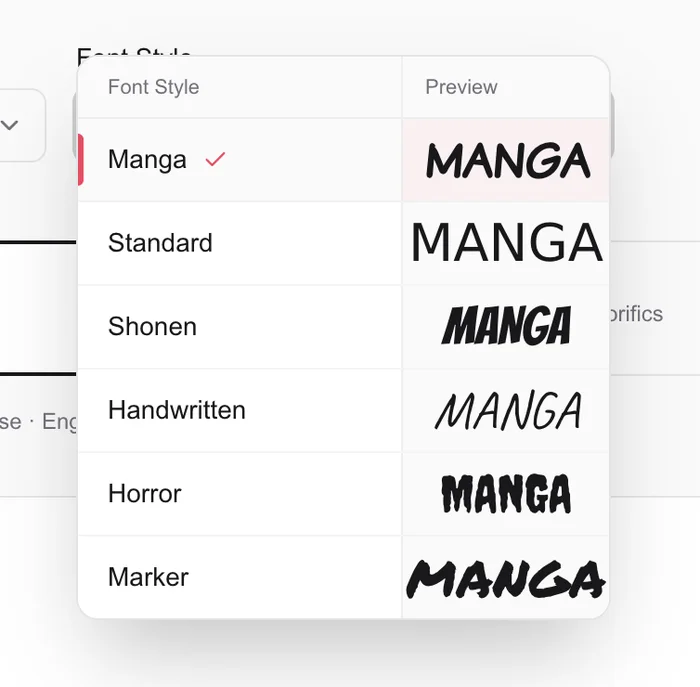
| Lettering | Per line: font, size, letter spacing, line spacing, horizontal or vertical; the text box moved, resized, rotated | One font style for the whole upload |
| Text drawn on the art | Retouch this page (2 credits a block); Brush and Eraser to fix the art by hand | Erased and replaced automatically |
| Another language | Translate into another language: a new edition, the pages not read again | Upload again |
| Your pages | Not stored on Serifu's servers; kept in your browser or on your computer; delete them any time | On their servers until deleted after 5 days; you cannot delete them yourself |
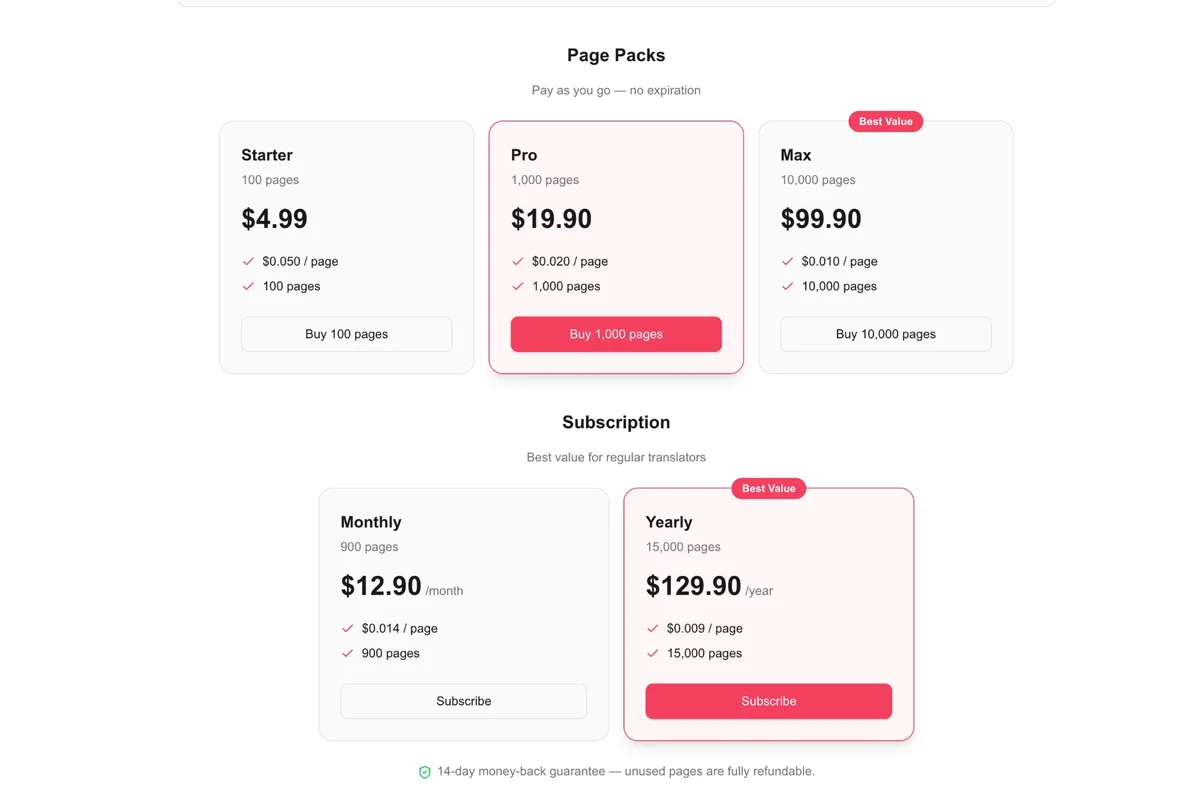
| Price | 1 credit a page; 100 pages $5.99 to 1,500 $59.99 (6 to 4 cents a page); 5 free pages | Page packs 100 pages $4.99 to 10,000 $99.90 (5 to 1 cent a page); subscriptions $12.90 a month or $129.90 a year |
The test: five pages, both tools
Five pages, chosen to cover what readers bring: two Japanese manga pages with bubbles and captions, a Japanese page with a title drawn on the art, a Korean manhwa page and a Korean webtoon strip. The manga is Give My Regards to Black Jack vol. 1 by Shuho Sato (free for secondary use); the manhwa and the webtoon are 「동백꽃」 by 이호윤 (CC BY). On AI Manga Translator we used the defaults it offered: the "Manga" font style and its default translation style.
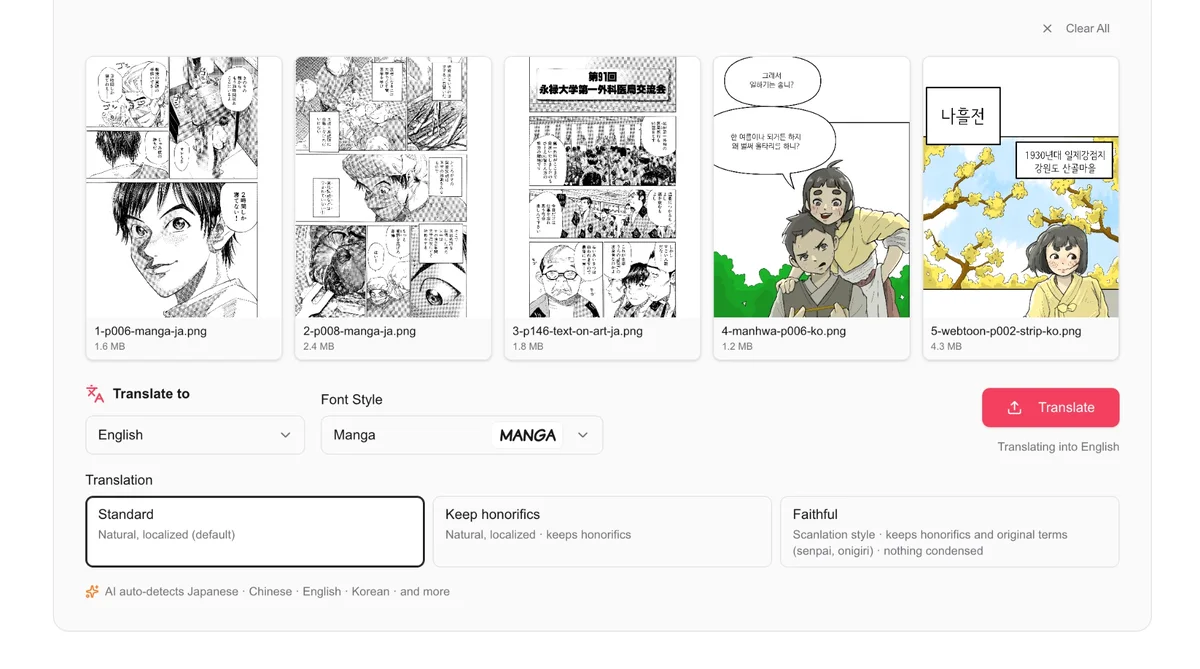
Lettering: does the translation fill the bubble?
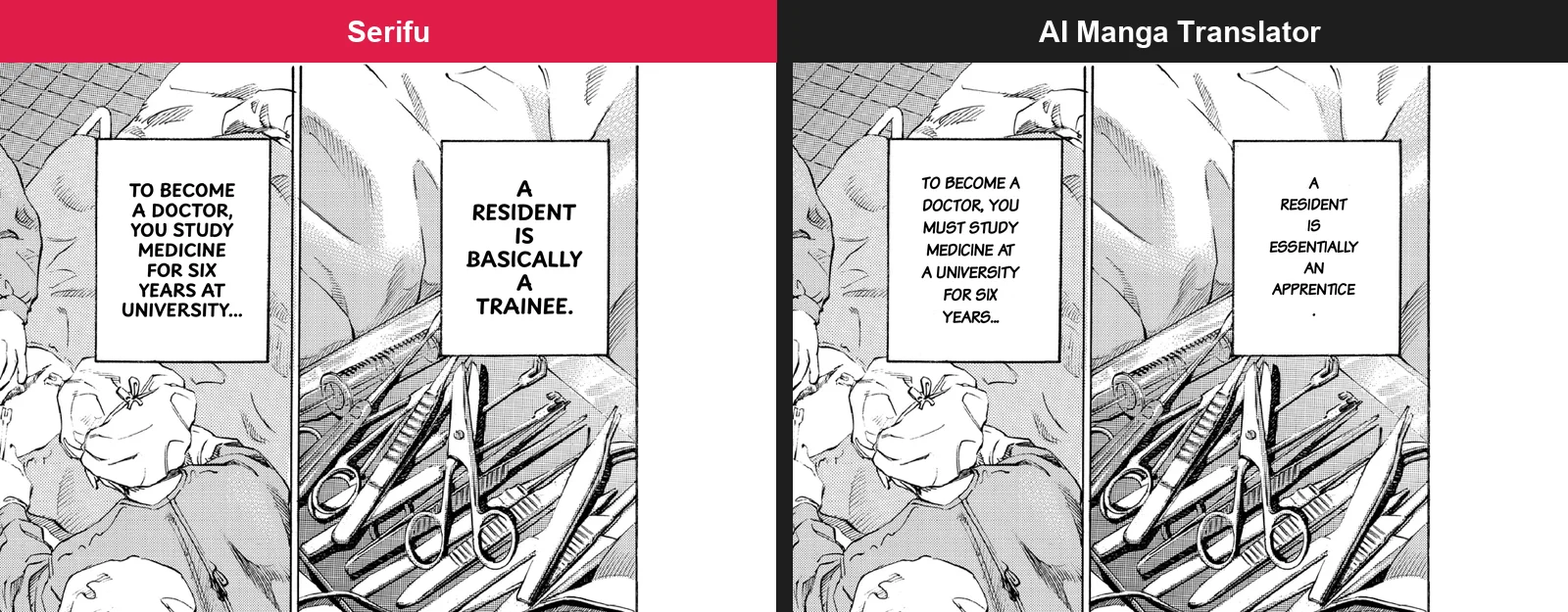
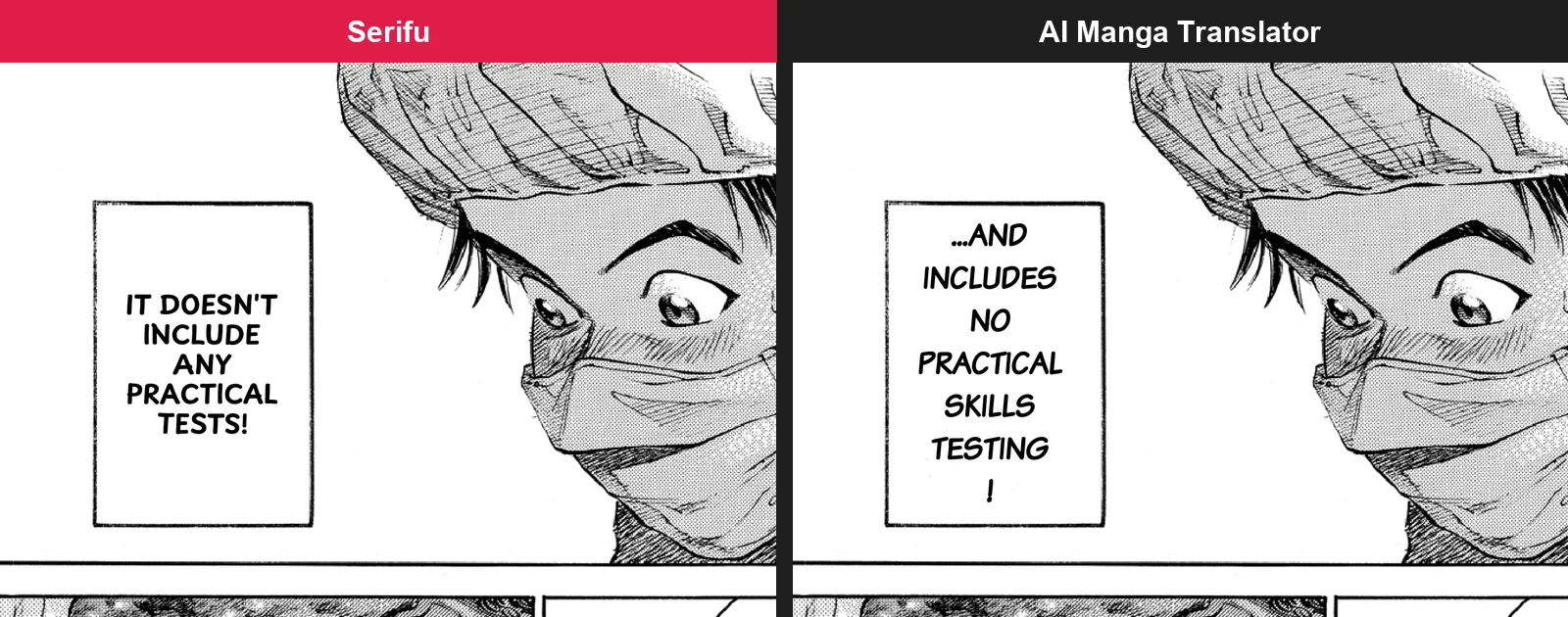
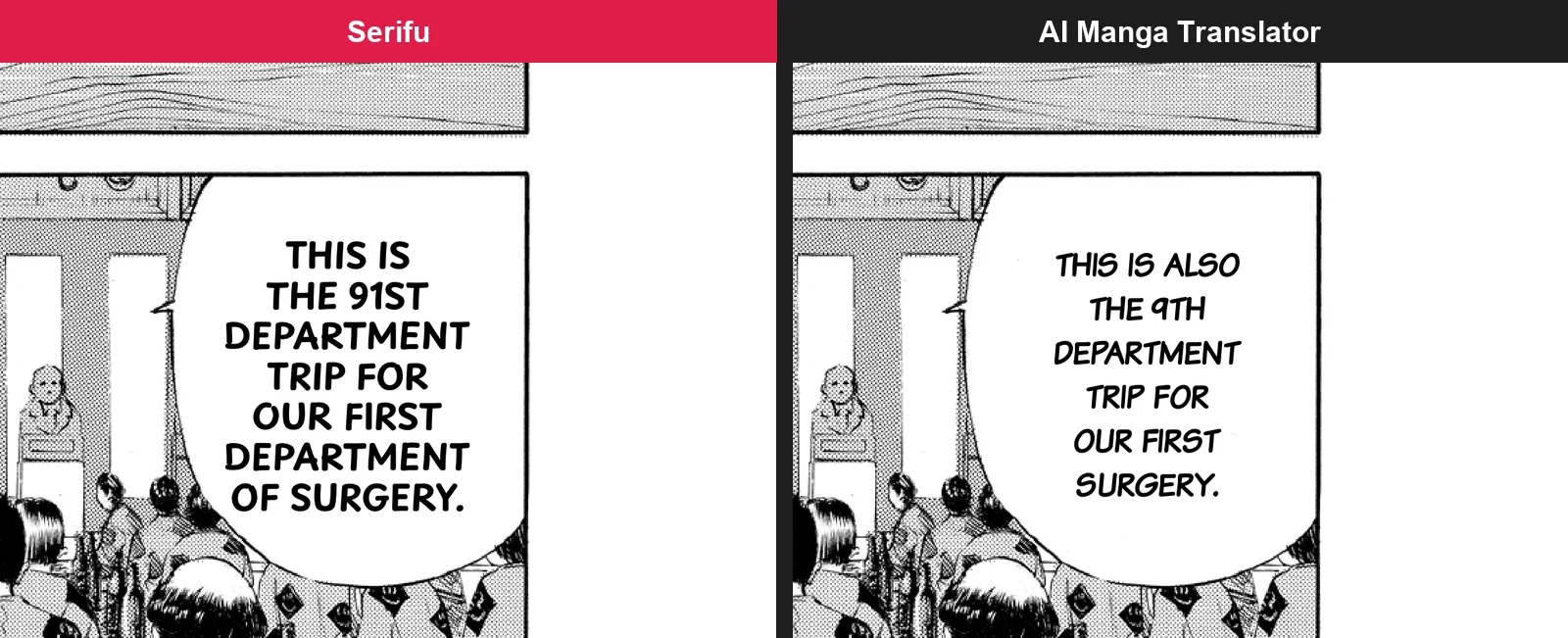
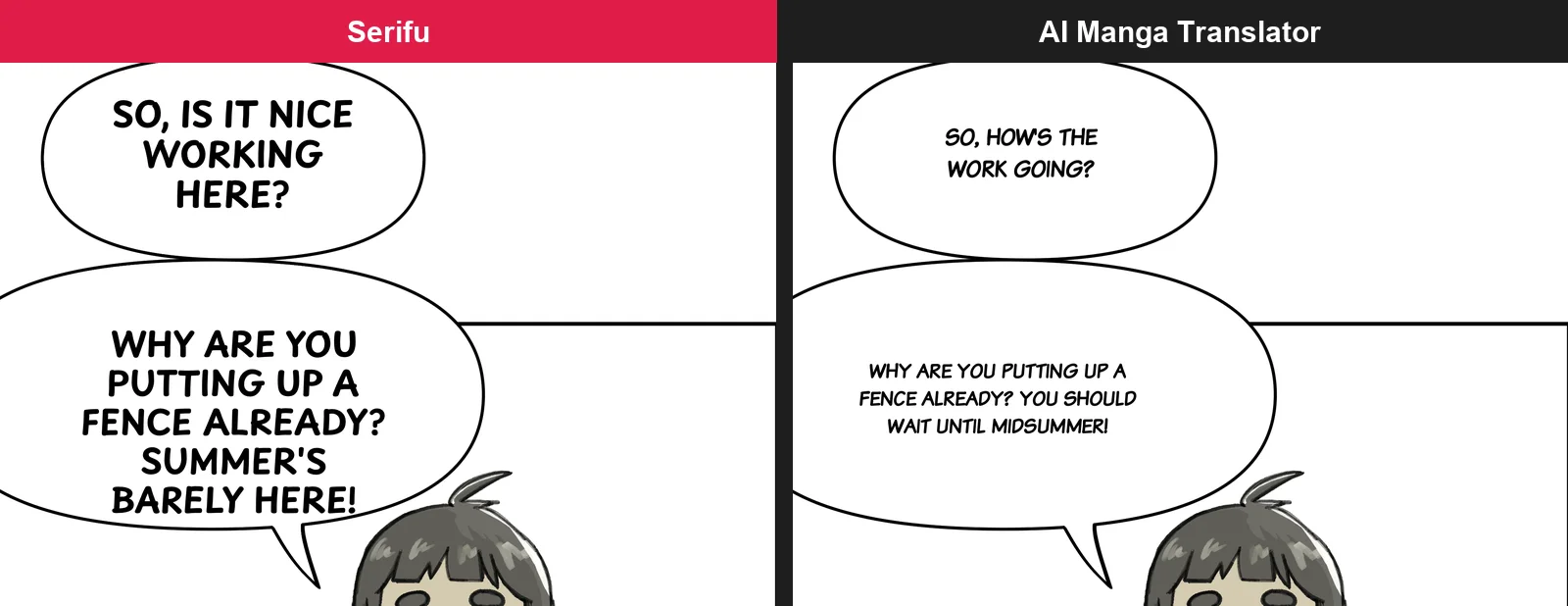
Serifu sets each line large enough to fill its bubble; AI Manga Translator's text is smaller and often leaves most of the bubble empty.
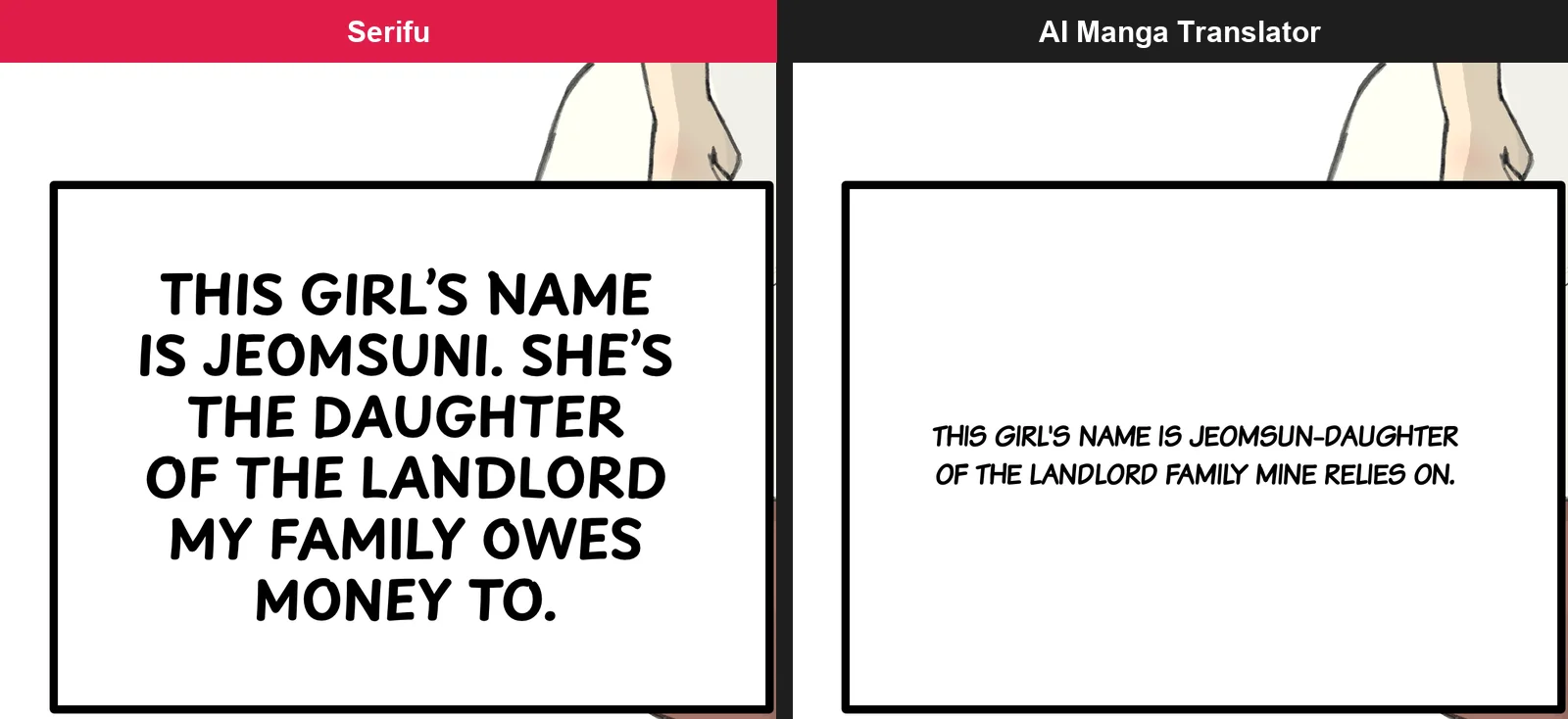
On the webtoon strip the difference matters most: on a phone, AI Manga Translator's captions are two thin lines in a box sized for five.
Its line breaks also leave punctuation alone on a line: "APPRENTICE" then "." on manga page 8, "TESTING" then "!".
Sound effects and text drawn on the art
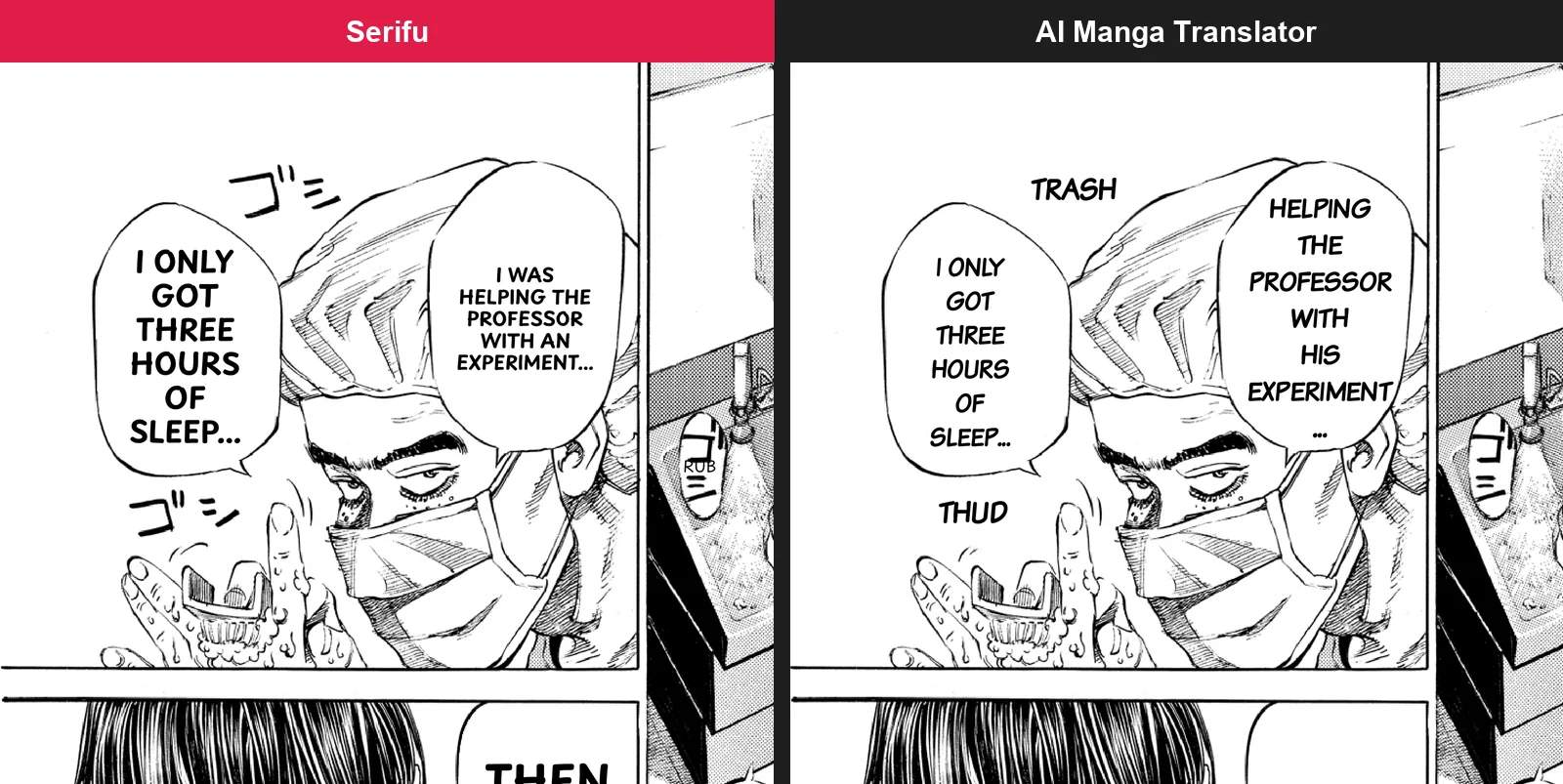
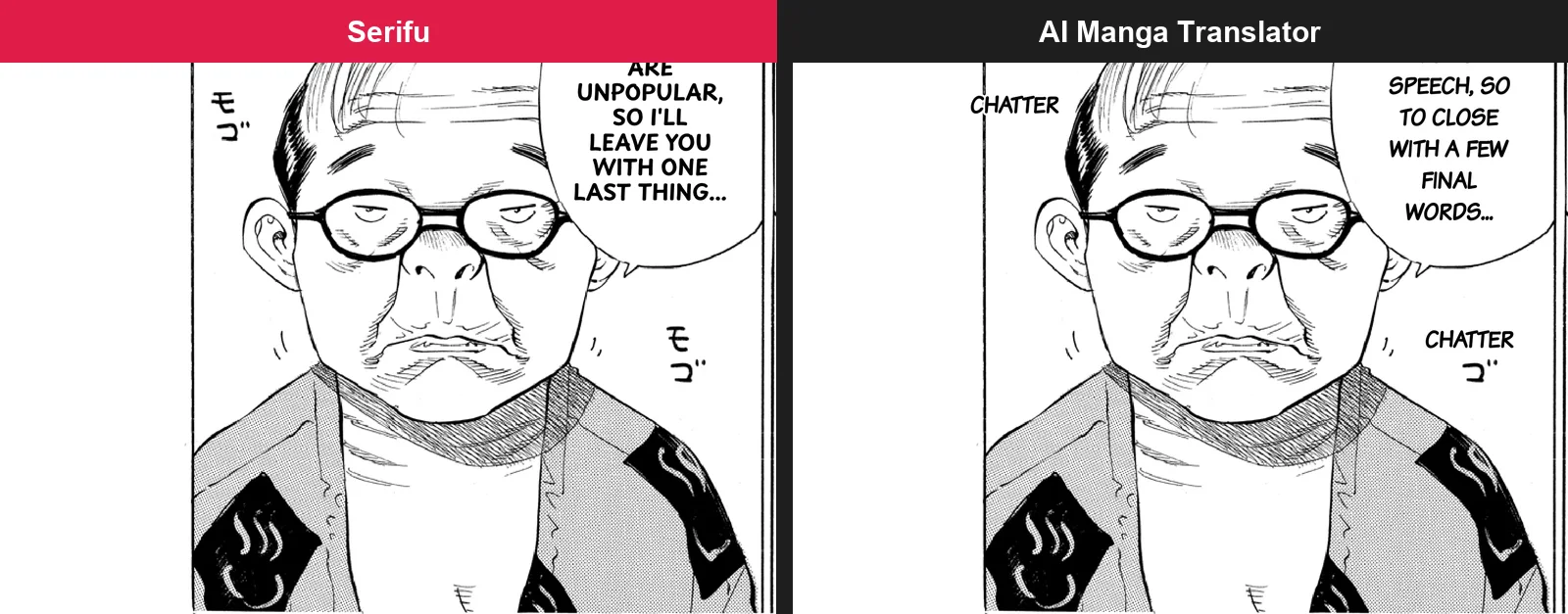
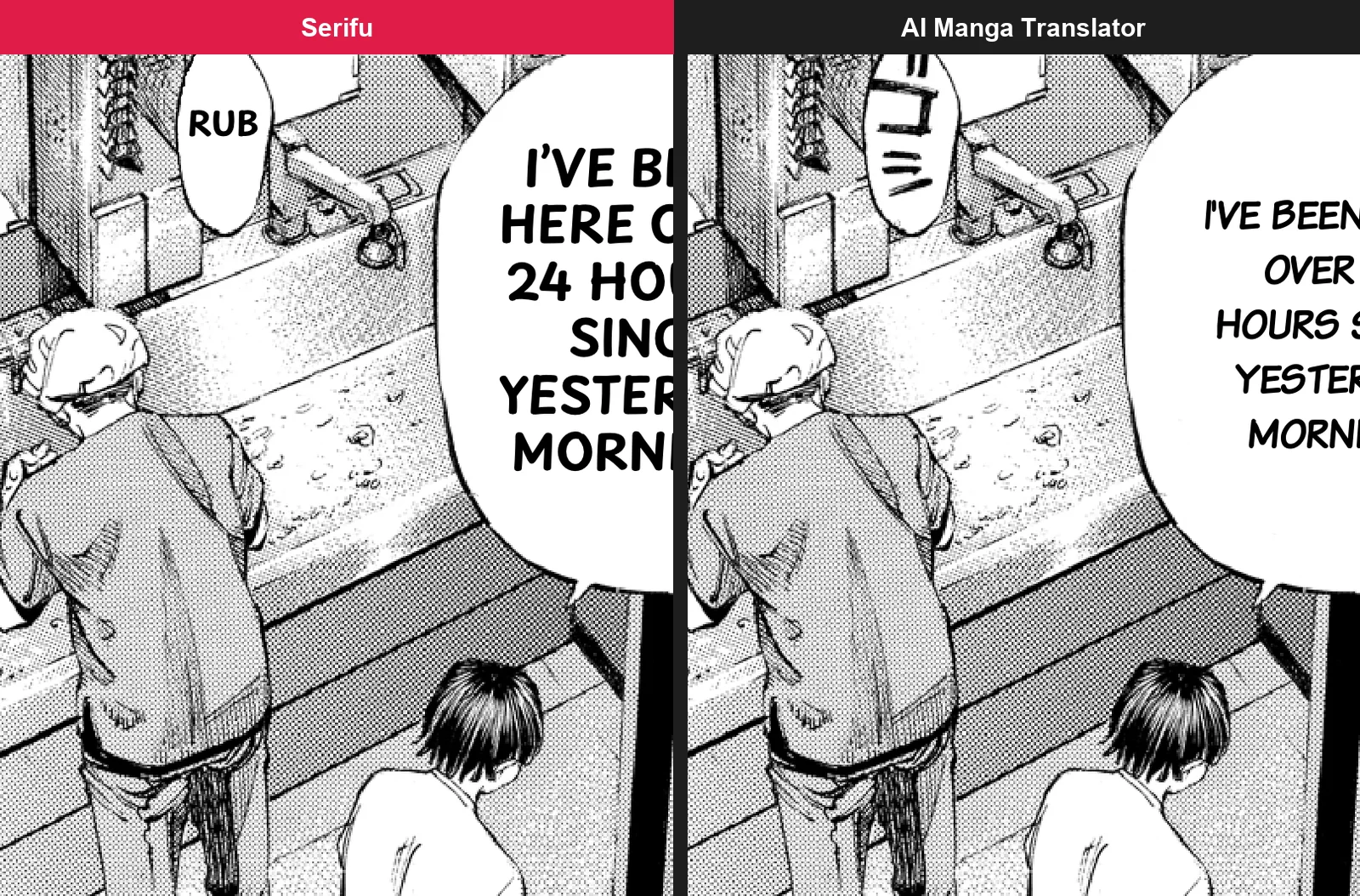
AI Manga Translator erases sound effects drawn on the art and writes English in their place, but on our pages the English did not match the sound: the scrubbing of hands, ゴシゴシ, became "TRASH" and "THUD", and the mumbling モゴモゴ became "CHATTER", with a ゴ left behind under it. Serifu keeps sound effects drawn on the art until you retouch them, and translates the ones in bubbles. The hand-scrubbing sound is in the first picture above, beside the bubbles.
For a title on the art, Retouch this page redraws the art behind it and letters the translation there. Serifu's sign reads in large type; AI Manga Translator's in one small line.

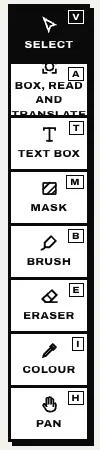
Anything the cleaning leaves behind can be painted over in the app with the Brush and taken back with the Eraser, free, on your computer.
What you can change after the translation
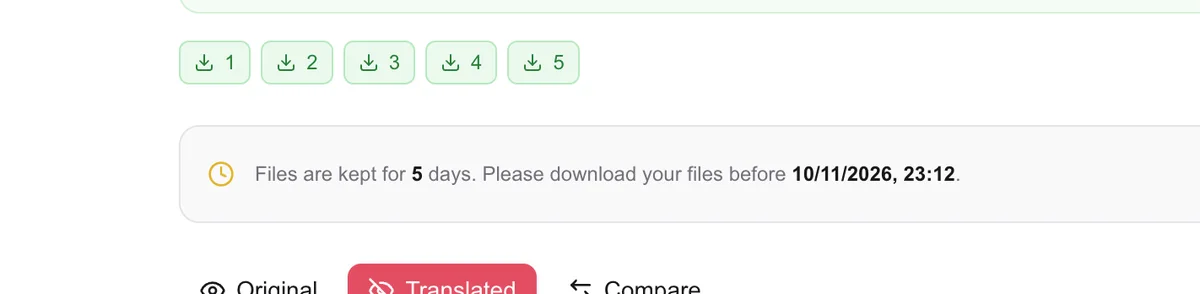
Nothing, on AI Manga Translator: its result page shows the original, the translation and a comparison, with a download for each page and a ZIP.
On Serifu:
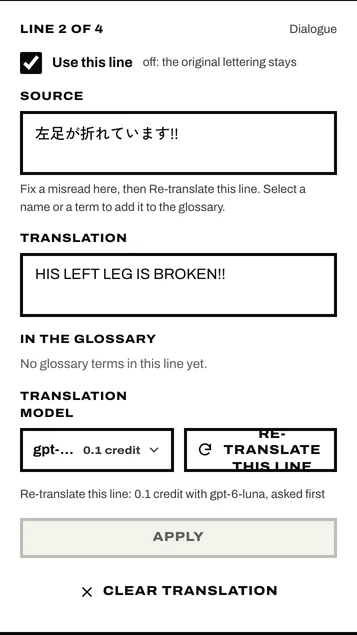
- Every line: select it on the page, change the translation or the original, or re-translate this line.
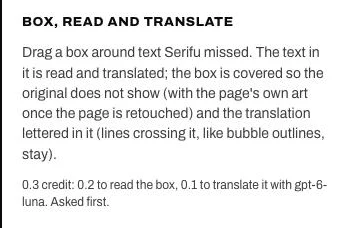
- Text it missed: Box, read and translate any area.
- The lettering of each line: font, size, letter spacing, line spacing, horizontal or vertical, and the text box moved, resized and rotated on the page (Lettering).
- The art: Retouch this page, then Brush and Eraser.
- The series: a project with its glossary and its story and characters, sent with every page; Translate into another language makes a new edition without reading the pages again.
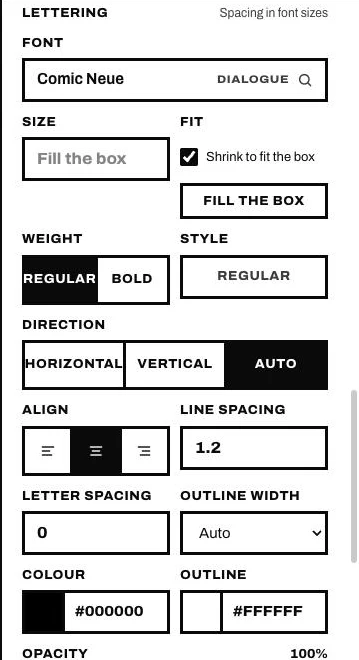
AI Manga Translator's only choice about lettering is one font style for the whole upload, made before it starts.
In the browser on serifu.net you can change a line and see it lettered again; fonts, sizes and retouching are in the app.
Accuracy: close on the first pass, kept right on Serifu
The first-pass translation is close on both: neither tool was right everywhere on our five pages. What differs is what keeps it right. Serifu translates each page with the two pages before it, so who is speaking, names and numbers carry over from page to page; AI Manga Translator processes the pages of an upload in parallel and does not say that a page sees the ones before it. On top of that, Serifu sends the glossary and the story and characters you write with every page.
In detail: on the Japanese pages both were right, with one exception on each side; on the Korean pages AI Manga Translator stayed closer to the original, and Serifu was freer.
- AI Manga Translator turned "the 91st department trip" (91回目) into "the 9th".
- Serifu first read the university's name, 永禄, wrongly, and differently on each run. One line in the glossary, 永禄大学 = Eiroku University, fixed it on that page and on every page after.

- On the manhwa page, 한 여름이나 되거든 하지 ("do it when midsummer comes") is "you should wait until midsummer" on AI Manga Translator and "Summer's barely here!" on Serifu; on the webtoon, Serifu's "the landlord my family owes money to" says more than 신세지고 있는 ("we are beholden to").
- Serifu spelled the girl's name two ways, "Jumsoon" and "Jeomsuni", because the two pages were run separately, with no project and no glossary; in a project, one glossary line keeps it the same on every page.
That is the difference that lasts: on AI Manga Translator a wrong line stays wrong unless you upload the page again and hope; on Serifu you change it, re-translate it, or tell the translator once.
Where your pages are kept
Serifu does not keep your pages; AI Manga Translator deletes them after 5 days, and until then you cannot delete them yourself. On serifu.net each page is sent to Serifu's servers only to be read and translated, and not stored afterwards (Privacy); the volume stays in your browser, or on your computer in the app, and you can delete it any time. AI Manga Translator's result page says files are kept for 5 days, its FAQ that they are deleted after 5 days, and on 6 October 2026 we found no way to delete a translation before then (the result page above).
Which one should you use?
Use AI Manga Translator if you want the lowest price per page and a page translated with no decisions, and you do not mind what comes back. Use Serifu if you read or translate whole volumes and want them to read like a translated book: names that stay the same, lettering that fills the bubbles, and every line, font and patch of art yours to fix.
Translate 5 pages free · Download the app
FAQ
Is there an alternative to AI Manga Translator that lets me edit the translation?
Yes. Serifu translates manga, manhwa and webtoons and lets you change any line, its lettering and the art afterwards, in the app; in the browser you can change a line and see it lettered again.
Which is more accurate, Serifu or AI Manga Translator?
Neither, clearly. On our Japanese pages both were right except one line each; on the Korean pages AI Manga Translator stayed closer to the original. Serifu's mistakes were fixed with a glossary line and stay fixed, while on AI Manga Translator a wrong line means uploading the page again.
Does Serifu use the previous pages when it translates?
Yes. With Translate in order (on by default) each page is translated with the two pages before it, so speakers, names and numbers stay the same across the volume; the glossary and the story and characters go with every page too.
Does AI Manga Translator translate sound effects?
It erases sound effects drawn on the art and writes English there; on our pages the words did not match the sounds. Serifu translates sound effects in bubbles and handles those on the art with Retouch this page.
Does AI Manga Translator keep my manga pages?
Yes, until they are deleted after 5 days, according to its site; we found no way to delete them yourself before then. Serifu does not store your pages on its servers; they stay in your browser or on your computer, and you can delete them any time.
How much does each cost?
Serifu: 1 credit a page, packs of 100 pages for $5.99 to 1,500 for $59.99, credits never expire, 5 free pages to start; Retouch this page is 2 credits a block. AI Manga Translator: page packs from 100 pages for $4.99 to 10,000 for $99.90, or 900 pages a month for $12.90 (on 6 October 2026). Per page, AI Manga Translator is cheaper.
Tested 6 October 2026. Other tools change; if something here is out of date, tell us.