Story and characters
Tell the translator about the series, its people and how it should read, so every page is translated with it.
The translator reads each page with the two before it, but it does not know who Saito is, that the senior doctors
are blunt, or that you want to keep -san and -sensei. A project's settings tell it, with every page, at no
extra cost.
Open a project and click Project settings, or Edit in its What the translator knows card.
Story
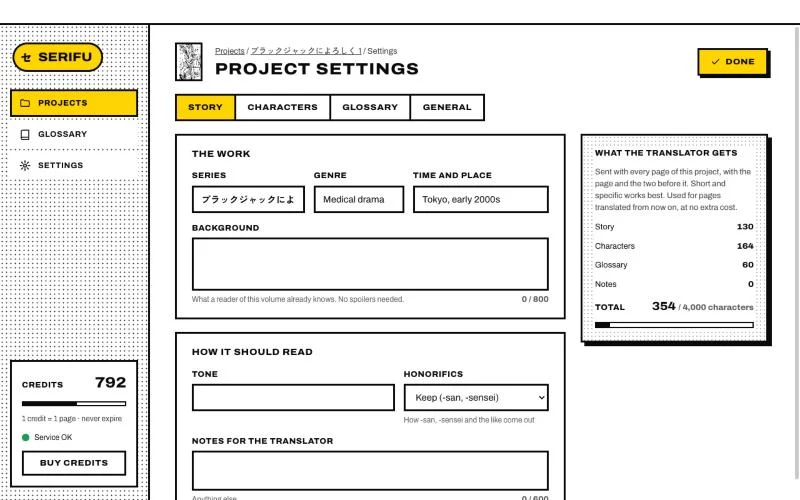
- Series, Genre, Time and place: one line each is enough.
- Background: what a reader of this volume already knows. No spoilers needed.
- Tone: how the dialogue should sound.
- Honorifics: keep them (
-san,-sensei), translate them (Mr., Doctor), leave them out, or leave it up to the translator. - Notes for the translator: anything else.
Characters
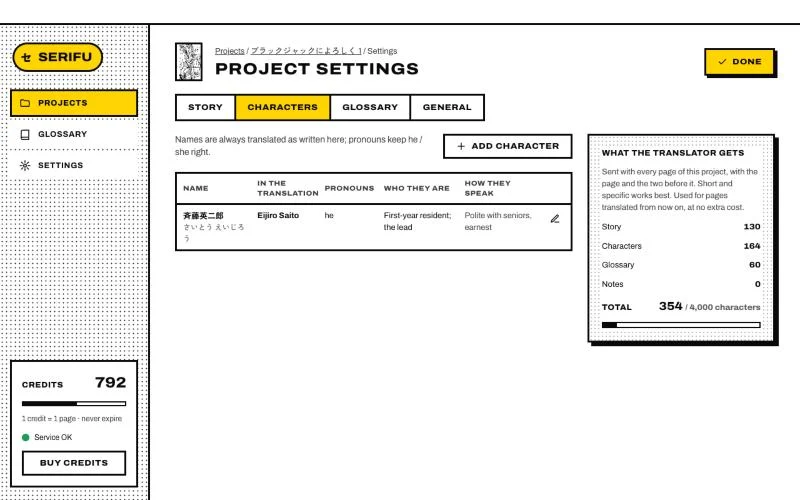
Add character for each person: the name as written in the volume, its reading, the name in the translation, what others call them, their pronouns, who they are and how they speak. Names are always translated as written here, and pronouns keep he and she right where the original leaves them out.
Glossary and General
Glossary picks the glossary the project uses. General has the project's name, its translation model and Translate in order.
What the translator gets
The card beside it counts what goes with every page: story, characters, glossary and notes. Short and specific works best; if it is too long, Serifu asks you to shorten it before it saves.
Changes are used for pages translated from then on. Pages already translated keep their text until you use Re-translate this page or Re-translate this line.